Payment Guidelines (Local/International Participant)

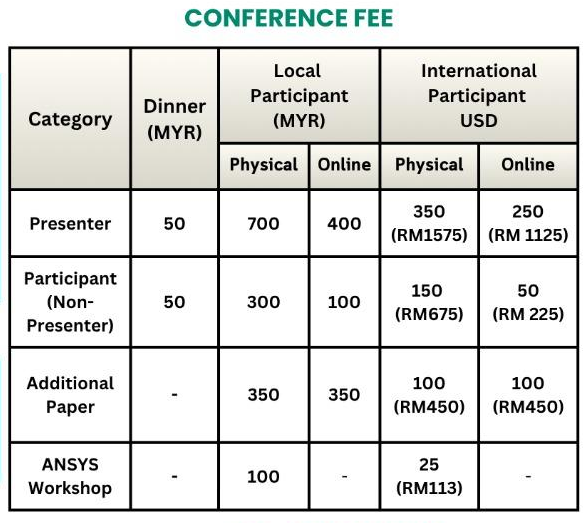
Please read the following payment instructions carefully before making your payment. Ensure that you have identified the correct registration category and corresponding fee before proceeding with payment. It is important that you enter the correct Remarks/Reference exactly as indicated in the CONFERENCE FEE, as this information will be used to verify your payment and process your registration. Kindly upload the Proof of Payment using this link  CLICK HERE

DIRECT PAYMENT THROUGH IIUM PAYMENT GATEWAY (EzPay)

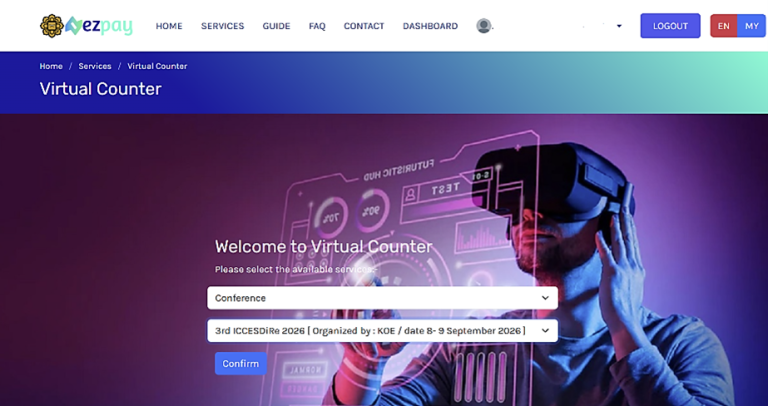
Step 1: Visit the IIUM Payment Gateway using the following link
https://ezpay.iium.edu.my/services/virtual-counter
OR
If you wish to keep track of your payment through the registration system, proceed directly to Step 4 using the following link:
(a) ICAMME 2026 Registration and Conference Dinner
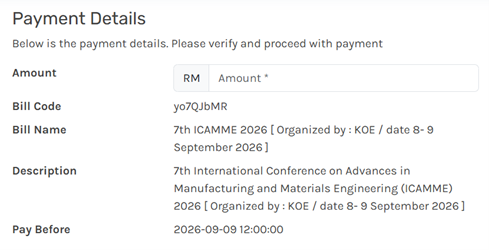
https://ezpay.iium.edu.my/pay/yo7QJbMR

(b) ICAMME 2026 Pre-Conference Workshop
https://ezpay.iium.edu.my/pay/vnVQkWoX

Step 2: Select the payment type > Conference > 7th ICAMME 2026 [Organized by: KOE / date 8-9 September 2026]

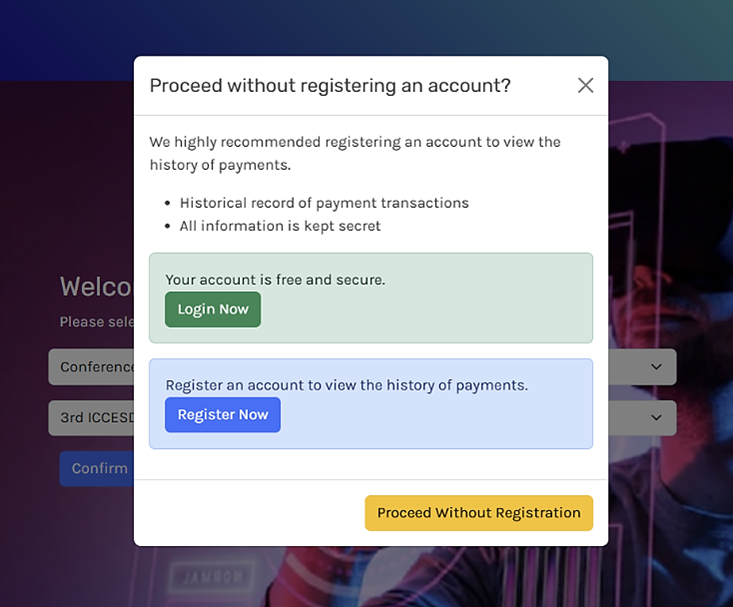
Step 3: You may “Login” if you have already have an account with EzPay (IIUM Staff or Student) or choose “Register Now” to create an account. Else, you may choose “Proceed without registration

Step 4: Enter the payer’s information and specify the correct payment amount in RM XXX.XX (indicated on the ICAMME 2026 website-
https://conference.iium.edu.my/icamme/payment-guidelines-2026/
*if you plan to attend the conference dinner, please ensure that your payment includes the dinner fee

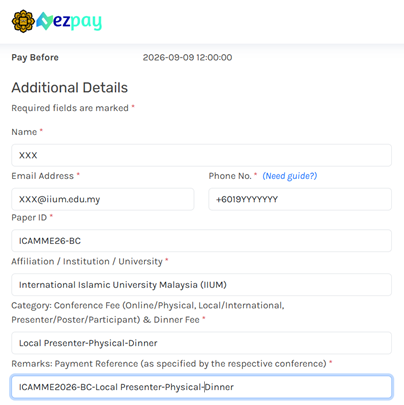
Step 5: Fill in the “Additional Details”. A brief guide for the ‘Category’ and ‘Remarks’ fields, for example (refers to the examples)

Step 6: Select your payment method. Types of payment accepted:

  1. FPX – Financial Process Exchange (Saving / Current / Credit Card)
  2. E-Wallet (Boost / GrabPay / Touch n Go eWallet / ShopeePay)
  3. Credit Card for International card issuer

Step 7: Complete the payment by following instructions on your screen.

Step 8: Complete
DIRECT PAYMENT THROUGH BANK TRANSFER

For direct transfer, please refer to the Banking Account payment details below:

    1. Bank: Bank Muamalat Malaysia Berhad (BMMB)
    2. Account Name: UIAM OPERATING ACCOUNT
    3. Account Number: 1407-000000-4716
    4. Swift code: BMMBMYKL
    5. Branch: International Islamic University Malaysia (IIUM), Gombak, Selangor
    6. Mode of payment: By Cash Counter at BMMB, or Online Banking.
    7. Reference payment: Conference name-Paper ID. Example: ICAMME2026-10
PAYMENT USING ISSUED INVOICE (co-host & other non-IIUM participants)

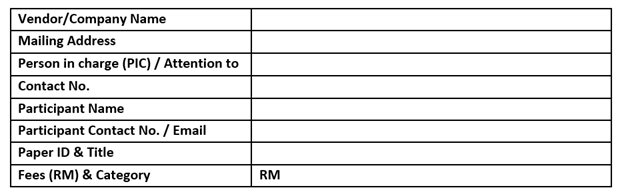
Invoice will be issued upon request and must be submitted via email to icamme@iium.edu.my alongside the quotation with the following details

Conference Name: ICAMME2026

Required Attachments: –

  1. Acceptance letter / Local Order / Purchase Order
  2. Agreeable acknowledgment from a vendor on the quotation offered with the company’s letterhead (if any)
  3. Agreement or memorandum of understanding (if any).
PAYMENT USING RESEARCH GRANTT (IIUM participant)

The procedure for payment of registration fees by using research grant is as follows:

  1. Participants have to fill up the ‘Application for Attending Conference’ form (get approval from RMC) 
  2. Participants request Kulliyyah or Secretariat to issue a journal request memo by giving the completed forms once approved (Attending Conference form).
  3. Participants have to fill up the ‘RMC Request Payment’ form (get approval from HOR/Deputy Dean RMC). Attached with memo and Approved attending conference form. 
  4. HOR/RMC will submit the applications (memo, approved attending conference form and RMC Request payment form) to Finance Zone Office 2.
  5. Finance Zone Office 2 will request the Account Unit, Finance Division to journalize the payment upon receiving complete documentation from HOR/RMC.